The HP Smart Tank 5103 is an all-in-one device designed to handle essential home and small-office tasks with the ability to print, copy, and scan. It features HP Thermal Inkjet technology and uses a four-bottle ink system, consisting of one black and three color bottles, ensuring efficient and economical printing. With a 980 MHz processor and 64 MB of integrated memory, the printer is built for smooth everyday use. The printer delivers speeds of up to 12 ppm for black and 5 ppm for color in ISO mode, while draft mode boosts performance up to 30 ppm (black) and 24 ppm (color). It also supports borderless printing up to 8.5 x 11 inches and provides high-quality output with up to 1200 x 1200 rendered dpi for black and 4800 x 1200 optimized dpi for color prints.
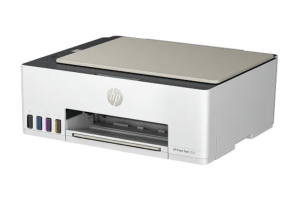
This multifunction printer uses a flatbed CIS scanner with up to 1200 x 1200 dpi resolution, supporting file formats including JPG, PDF, PNG, TIFF, and HEIF. Users can scan through the copy function, HP software, or the embedded web server, with a maximum scan size of 8.5 x 11.69 inches. Copying speeds reach up to 10 cpm for black and 2 cpm for color, with resolutions up to 600 dpi for both text and graphics. The device allows up to 99 copies and offers adjustable copier settings such as resizing, lighter/darker control, ID copy, quality modes, and enhancements. HP Smart Tank 5103 has a monthly duty cycle of up to 3,000 pages with a recommended volume of 400 to 800 pages, and supports a variety of media types, including plain paper, brochures, glossy photo papers, envelopes, and specialty inkjet papers. Connectivity options include Hi-Speed USB 2.0, built-in Wi-Fi 802.11b/g/n, and Wi-Fi Direct, enabling easy network printing without a router. Mobile printing is fully supported through the HP Smart app, Apple AirPrint, Mopria Print Service, HP Print Service Plugin, and direct wireless printing.
HP Smart Tank 5103 Instructions Manual
The manual below includes a User Guide to teach the user how to use the printer, a Setup and a Reference Guide to prepare the installation and assemble the printer.
Download the HP Smart Tank 5103 User Guide, Reference, and Setup
HP Smart Tank 5103 User Guide
Filename: pdf_7527706_en-US-1.pdf
Size: 3.79 MB
Description: This guide provides configuration, using the printer, warranty, safety and environmental information.
HP Smart Tank 5103 Setup and Reference Guide
Filename: pdf_11731938_en-US-1.pdf
Size: 12.54 MB
Description: Describe the printer’s function, and get help to set up your printer.
All HP Smart Tank 5103 Manuals are copyrighted by Hewlett-Packard, user agrees to the agreement from HP.