The HP ENVY Photo 7975 is an all-in-one inkjet printer designed for home users and small offices that need everyday document handling alongside high-quality photo printing. Operation is made intuitive through a 2.7-inch diagonal color capacitive touchscreen, which provides easy access to settings, copying, scanning, and photo printing features with a multitasking capability that allows multiple jobs to be processed efficiently. The printer also offers automatic duplex printing, a 35-sheet automatic document feeder, a 125-sheet main input tray, and a dedicated 15-sheet photo tray, making it convenient for mixed document and photo tasks. With a first-page-out time as fast as 18 seconds and a recommended monthly volume of 300 to 400 pages, this printer is well-suited for regular home or light office workloads. Using HP Thermal Inkjet technology, the printer delivers sharp black text at up to 1200 × 1200 rendered dpi and vibrant color output at up to 4800 × 1200 optimized dpi when printing from a computer. It uses two ink cartridges—one black and one tri-color—balancing simplicity and print quality. Connectivity is a key strength of the HP ENVY Photo 7975, featuring built-in self-healing dual-band Wi-Fi with support for both 2.4 GHz and 5 GHz networks, as well as USB 2.0. Mobile and wireless printing are fully supported through the HP app, Apple AirPrint, Mopria Print Service, and Chrome OS compatibility.
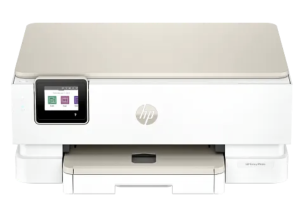
HP ENVY Photo 7975 Driver for Windows and macOS
Refer to the operating system’s compatibility and ensure the HP ENVY Photo 7975 printer is compatible with your PC or Mac to avoid an error when installing the driver or using the printer.
Download HP ENVY Photo 7975 Drivers and Software Compatibility
Windows Driver:
- Windows Compatibility: Windows 8.1, Windows 10, and Windows 11
HP ENVY Photo 7975 Easy Start Printer Setup Software and Driver Download
Filename: HPEasyStart_17_3_14.exe
Version: V17.3.14
Size: 24.0 MB
HP ENVY Photo 7975 Universal Scan Driver Download
Filename: Full_Webpack-63.6.6364-SJ0001_Full_Webpack.exe
Version: V63.6.6364
Size: 439.6 MB
macOS Driver:
- macOS Compatibility: macOS 26, macOS 15, macOS 14, macOS 13, macOS 12, macOS 11
HP Print and Support for Mac: Install from App Store
The HP ENVY Photo 7975 printer is AirPrint-supported.
Download Also: HP ENVY Photo 7975 Manual to guide you how to install the printer
All HP ENVY Photo 7975 Drivers are copyrighted to Hewlett-Packard; the customer agrees to the applicable license or other agreement from HP.