The HP Smart Tank 7603 is a versatile all-in-one printer designed for home offices and small businesses, offering print, scan, copy, and fax functionality in one convenient device. The innovative ink bottle system also makes refilling the high-capacity ink tanks cleaner and easier. It delivers print resolutions of up to 4800 x 1200 dpi, with print speeds of up to 15 pages per minute in black and 9 pages per minute in color. The printer also supports automatic duplex printing for efficient two-sided documents and can handle media sizes up to 8.5 x 14 inches. For scanning, it features a 1200 x 1200 dpi optical scan resolution, an 8.5 x 11.7-inch flatbed scan area, and a 35-sheet automatic document feeder (ADF) for processing multi-page documents. Paper handling includes a 250-sheet input tray and 100-sheet output tray, while the 3-inch monochrome touchscreen provides an easy way to control printer functions and settings. Connectivity options include USB 2.0, Ethernet, Wi-Fi 5 (802.11ac), and RJ11 fax connectivity. Its dual-band, self-healing Wi-Fi is designed to automatically detect and resolve connection issues, helping maintain a reliable wireless connection. With its user-friendly setup, efficient tank design, versatile connectivity, and AI-enhanced features, the HP Smart Tank 7603 is well suited for users who need a productive and convenient printing solution.
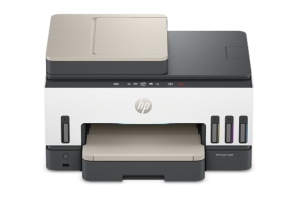
HP Smart Tank 7603 Instructions Manual
The manual below includes a User Guide to teach the user how to use the printer, a Setup Guide, and a Reference to prepare for the installation and assemble the printer.
Download the HP Smart Tank 7603 User Guide, Reference and Setup
HP Smart Tank 7603 User Guide
Filename: pdf_4228145_en-US-1.pdf
Size: 3.84 MB
Description: This guide provides the configuration and how to use an HP printer.
HP Smart Tank 7603 Reference Guide
Filename: pdf_11949540_en-US-1.pdf
Size: 1.15 MB
Description: Describes the printer’s function and hardware.
HP Smart Tank 7603 Setup
Filename: pdf_11949765_en-US-1.pdf
Size: 2.01MB
Description: Get help to set up your printer.
All HP Smart Tank 7603 Manuals are copyrighted by Hewlett-Packard; the user agrees to the agreement from HP.