The HP Color LaserJet Enterprise MFP M480f is a compact enterprise-grade color laser multifunction printer designed for small to medium-sized offices that require reliable performance, robust security, and efficient document workflows. An 800 MHz processor powers the device and includes 2 GB of memory along with 16 GB of eMMC storage to ensure smooth multitasking and responsive operation. A 4.3-inch color touchscreen provides an intuitive interface for managing print, scan, copy, and fax functions. For document handling, the printer includes a 50-sheet multipurpose tray, a 250-sheet standard input tray, and a 150-sheet output bin. An optional 550-sheet tray can be added to increase paper capacity for larger workloads. It combines printing, copying, scanning, and faxing capabilities in a single device, making it suitable for busy work environments that handle a variety of office tasks daily. With print speeds of up to 27 pages per minute in both color and monochrome, the printer delivers consistent productivity while maintaining professional-quality output. This model features automatic duplex printing and supports a print resolution of up to 1200 × 1200 dpi, producing sharp text and vibrant color graphics. The first page can be printed in as fast as 9.3 seconds for black-and-white documents and 10.9 seconds for color prints, helping reduce waiting time for urgent tasks. The machine has a monthly duty cycle of up to 55,000 pages, while the recommended monthly print volume ranges from 900 to 4,800 pages, making it well-suited for demanding office environments. Connectivity options include Gigabit Ethernet, high-speed USB 2.0, and a walk-up USB port for direct printing and scanning. Optional wireless accessories enable Wi-Fi, Bluetooth Low Energy, and NFC functionality for more flexible office integration. The HP Color LaserJet Enterprise MFP M480f also supports mobile printing technologies such as Apple AirPrint, Mopria, HP ePrint, and HP Roam, allowing users to print directly from smartphones, tablets, and laptops.
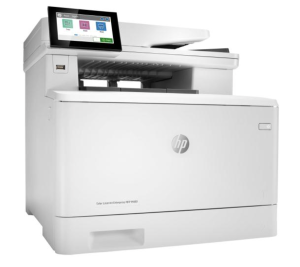
Download HP Color LaserJet Enterprise MFP M480f Driver for Windows and macOS
Refer to the operating system’s compatibility to ensure the HP Color LaserJet Enterprise MFP M480f printer is compatible with your PC or Mac and avoid an error when installing the driver or using the printer.
Download HP Color LaserJet Enterprise MFP M480f Drivers and Software Compatibility
Windows Driver:
- Windows Compatibility: Windows 8/8.1, Windows 10, and Windows 11
HP Color LaserJet Enterprise MFP M480f Full Driver and Software Solution Download
Filename: Full_Webpack-52.2.5009-CLJM480_Full_Webpack.exe
Version: V52.2.5009
Size: 78.2 MB
HP Color LaserJet Enterprise MFP M480f Scanner Driver Download
Filename: Full_Webpack-63.7.6442-SJ0001_Full_Webpack.exe
Version: V63.7.6442
Size: 436.3 MB
macOS Driver:
- macOS Compatibility: macOS 26, macOS 15, macOS 14, macOS 13, macOS 12, macOS 11
HP Easy Start for Mac Download
Filename: HP_Easy_Start.app.zip
The HP Color LaserJet Enterprise MFP M480f printer is AirPrint-supported.
Read Also: HP Color LaserJet Enterprise MFP M480f Manual to guide you how to install and use the printer
HP Color LaserJet Enterprise MFP M480f Drivers are copyrighted to Hewlett-Packard, the customer agrees to the applicable license or other agreement from HP.