HP LaserJet Enterprise 700 M712n, a printer for office and business purposes that is supported by high print speeds and quality print results. In addition, this printer can also print paper with sizes up to A3. With HP Cartridges with JetIntelligence technology, in addition to being more efficient and able to print more, printouts, both text and graphic images, will look sharp, thick black (black ink), and easy to read or view (print quality up to 1200×1200 dpi). The HP LaserJet Enterprise 700 M712n has a print speed of up to 40ppm (black), and the first-sheet print speed is only about 10 seconds. With laser printing technology, you will get clear and easy-to-read prints. This printer is very reliable to support busy office activities because it can be used to print up to 100,000 pages per month. This printer can print on standard document paper, envelopes, labels, and transparencies / OHP paper. In terms of paper handling, the input tray of this HP LaserJet Enterprise 700 M712n printer can be used to put up to 100 sheets of paper in the multi-purpose tray, and 2×250 sheets in the main tray. The output tray can be used to hold up to 250 sheets of printed paper at once. Security features (Security Control) that protect sensitive data. HP WebJetAdmin Management Tools that help optimize the printing process in your company, cut printing costs, and save more. Integrated management of security settings and an easy online auto-update solution. Print from anywhere, anytime with the HP ePrint feature.
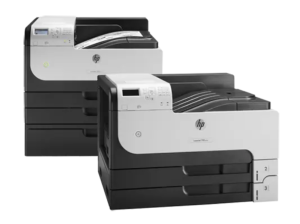
Download HP LaserJet Enterprise 700 M712n Manual Instructions
Refer to the operating systems compatibility to ensure the HP LaserJet Enterprise 700 M712n printer is compatible with your PC or Mac to avoid issues when installation, installing the driver or when using the printer.
Download HP LaserJet Enterprise 700 M712n User Guide and Hardware Installation
The manual below includes a User Guide to teach the user how to use the printer, an Installation Guide to prepare the installation and assemble the printer.
HP LaserJet Enterprise 700 M712n User Guide
File size: 3.93MB
HP LaserJet Enterprise 700 M712n – Hardware Installation Guide
File size: 3.16MB
Read Another Manual: HP LaserJet Enterprise M806dn Manual
In Conclusion, Get printing speed for black-and-white documents up to A3 size with energy-saving features and Security Control. Increase productivity and work potential faster, print A3 black and white and Paper Handling up to 4,600 Pages. The HP LaserJet Enterprise 700 M712n A3 Printer saves energy and controls printing costs. Auto On/Off and Instant-on Technology features help save energy, and two-sided printing automatically reduces paper usage. Management Tools help optimize printing habits in your work team.