The HP LaserJet Enterprise MFP 8601dn is a high-performance A3 monochrome multifunction laser printer built for large enterprises and busy workgroups that require exceptional speed, reliability, and advanced document management. A powerful quad-core 1.6 GHz processor, 6 GB of memory, and a responsive 10.1-inch WXGA color touchscreen ensure smooth performance and intuitive operation. Built to handle diverse office printing needs, it comes standard with a 100-sheet multipurpose tray and four 520-sheet input trays, along with automatic duplex printing to reduce paper consumption. It supports a wide range of paper sizes from A6 to A3, envelopes, labels, cardstock, and heavy media up to 325 g/m², making it suitable for everything from everyday business documents to specialty media.
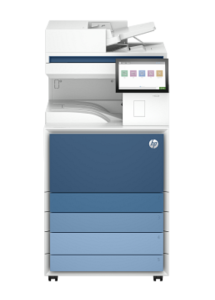
It delivers print and copy speeds of up to 70 pages per minute, with the first page printed in as little as 5.3 seconds, helping organizations maintain productivity even during demanding workloads. It features a high-speed flatbed scanner with a single-pass duplex automatic document feeder capable of scanning up to 150 images per minute, making it ideal for digitizing large volumes of documents. The copier supports up to 70 copies per minute, a copy range of 25% to 400%, and up to 9,999 copies per job, while the integrated fax system offers fast 33.6 kbps transmission, memory for up to 500 pages, and storage for 1,000 speed-dial entries. Designed for heavy-duty operation, HP LaserJet Enterprise MFP 8601dn supports a monthly duty cycle of up to 250,000 pages with a recommended monthly volume of up to 60,000 pages. Connectivity includes Gigabit Ethernet, USB 2.0 and USB 3.0 ports, with optional wireless networking available through an HP Jetdirect accessory. Mobile printing is supported through Apple AirPrint, Mopria, Wi-Fi Direct, and PrinterOn Print, while compatibility with Windows, macOS, Android, and iOS ensures seamless integration into modern enterprise environments.
HP LaserJet Enterprise MFP 8601dn Instructions Manual
The manual below includes a User Guide to teach the user how to use the printer, and an Installation and Repair Guide to prepare the installation, assemble, and maintain the printer.
Download the HP LaserJet Enterprise MFP 8601dn User Guide, Installation, and Repair Manual
HP LaserJet Enterprise MFP 8601dn User Guide
Filename: pdf_11525575_en-US-1.pdf
Size: 9.65 MB
Description: This guide Enterprisevides configuration, using the printer, warranty, safety and environmental information.
HP LaserJet Enterprise MFP 8601dn Installation Guide
Filename: pdf_12245259_en-US-1.pdf
Size: 2.72MB
Description: Get help to set up your printer.
HP LaserJet Enterprise MFP 8601dn Repair Manual
Filename: pdf_12503313_en-US-1.pdf
Size: 104.90MB
Description: Describe the printer’s function, hardware, and maintenance.
All HP LaserJet Enterprise MFP 8601dn Manuals are copyrighted by Hewlett-Packard, user agrees to the agreement from HP.