The HP DeskJet 4355 Wireless All-in-One Inkjet Printer is a versatile color printer designed for everyday home and small-office printing needs. Combining printing, scanning, and copying in a compact all-in-one design, it provides convenient functionality for documents, schoolwork, photos, and other common printing tasks. The printer supports wireless connectivity through Wi-Fi as well as wired USB-B connectivity, making it easy to connect with compatible computers and devices.
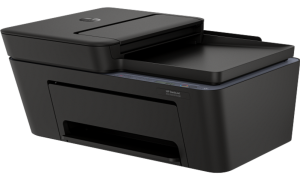
The printer delivers ISO print speeds of up to 8.5 pages per minute in black and 5.5 pages per minute in color. It supports color and photo printing with a maximum resolution of up to 1200 x 1200 dpi for black printing and up to 4800 x 1200 optimized dpi for color printing. The printer has a duty cycle of up to 1,000 pages per month, while its input tray can hold up to 60 sheets and the output tray accommodates up to 25 sheets. Automatic two-sided printing is not supported, so duplex documents require manual handling. For scanning and copying, the HP DeskJet 4355 features both flatbed and sheetfed scanning capabilities with a maximum optical resolution of up to 1200 x 1200 dpi. Its 35-sheet automatic document feeder (ADF) makes it more convenient to process multi-page documents. The copier supports up to 9 copies at a time, with black and color copy resolutions of up to 300 x 300 dpi.
The printer also includes a small display screen for basic operation and status information, although it does not feature a touchscreen. It uses HP 68 ink cartridges, with one black and one tri-color cartridge included. Approximate yields are up to 160 pages for black ink and 120 pages for color ink, and an ink subscription service is available for users who want a more convenient way to manage ink supplies. HP DeskJet 4355 is relatively compact and suitable for home workspaces. It supports Windows 10 and 11 as well as macOS 12 Monterey through macOS 14 Sonoma, with an internet connection required for certain features.
HP DeskJet 4355 Instructions Manual
The manual below includes a User Guide to teach the user how to use the printer and a Setup Guide to prepare for the installation and assemble the printer.
Download the HP DeskJet 4355 User Guide and Setup
HP DeskJet 4355 User Guide
Filename: pdf_12161035_en-US-1.pdf
Size: 2.00 MB
Description: This guide provides the configuration and how to use an HP+ compatible printer.
HP DeskJet 4355 Setup Guide
Filename: pdf_12166289_en-US-1.pdf
Size: 0.90MB
Description: Get help to set up your printer.
All HP DeskJet 4355 Manuals are copyrighted by Hewlett-Packard, user agrees to the agreement from HP.