The HPE Aruba AP-515 is a high-performance indoor wireless access point from Aruba’s 510 Series, designed for medium- and high-density environments such as offices, schools, healthcare facilities, and conference centers. Built on the Wi-Fi 6 (802.11ax) standard, it delivers faster speeds, improved efficiency, and enhanced performance for networks with many connected devices. It features a dual-radio architecture with a 4×4 MU-MIMO 5 GHz radio capable of delivering data rates of up to 4.8 Gbps, alongside a 2×2 MU-MIMO 2.4 GHz radio. Together, the radios provide a combined maximum throughput of approximately 5.4 Gbps. The access point supports advanced Wi-Fi 6 technologies such as OFDMA, MU-MIMO, Target Wake Time (TWT), and WPA3 security, helping improve network capacity, efficiency, and security. For wireless coverage, the HPE Aruba AP-515 includes integrated omnidirectional dual-band antennas optimized for indoor ceiling-mounted deployments. The antennas offer gains of up to 4.2 dBi on the 2.4 GHz band and 7.5 dBi on the 5 GHz band, providing reliable coverage and performance across enterprise environments.
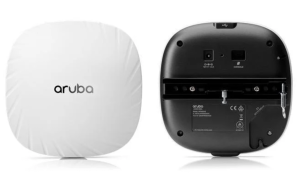
Connectivity options include a 2.5 Gigabit Smart Rate Ethernet port and an additional Gigabit Ethernet port, both supporting enterprise networking requirements. The access point also includes Bluetooth 5 and Zigbee (802.15.4) radios for IoT applications, a USB 2.0 Type-A port, a serial console interface, and support for link aggregation to increase bandwidth and redundancy. Security features include support for WPA3, WPA2, and Enhanced Open (OWE) encryption standards, along with Aruba’s enterprise-grade management and client optimization technologies. With its combination of Wi-Fi 6 performance, multi-gigabit connectivity, integrated IoT support, and advanced security capabilities, the HPE Aruba AP-515 is a versatile access point for modern business and campus wireless networks.
Download HPE Aruba AP-515 Manual Instructions
Refer to the specifications to ensure the HPE Aruba AP-515 is compatible with your requirements and to avoid issues during installation or use.
Download HPE Aruba AP-515 User Guide Manual
The manual below includes a Quick Setup Guide to teach the user how to use the HPE device.
The default password/credentials for HPE Aruba AP-515:
username: admin
password: admin or serial number of the device (Check the sticker on the back, SN usually in uppercase)
HPE Aruba AP-515 Installation Guide
Filename: AP-510_Install_Guide_EN.pdf
Size: 2.6MB
HPE Aruba AP-515 Startup Guide
Filename: AP-510_Startup_Guide_EN.pdf
Size: 2.6MB
Check Also: HPE Aruba AP-505 Manual
All HPE Aruba AP-515 Manuals are copyrighted by Hewlett-Packard Enterprise; the user agrees to the agreement from HPE.