The HP LaserJet Pro MFP 3101sdw is a monochrome laser multifunction printer designed for small businesses and workgroups. The printer features a 2.7-inch color touchscreen, an 800 MHz processor, and 512 MB of memory for responsive operation. Standard paper handling includes a 250-sheet input tray, support for 10 envelopes, and a 150-sheet output tray. Automatic duplex printing is built in, helping reduce paper consumption. Supported media include plain paper, labels, cardstock, postcards, and envelopes. It has printing, copying, and scanning in a compact device and delivers print speeds of up to 35 pages per minute (ppm). The printer produces sharp black-and-white documents with a maximum print resolution of 1200 × 1200 dpi, while the first page can be printed in as little as 6.6 seconds. It supports a monthly duty cycle of up to 50,000 pages, with a recommended monthly volume of 350–2,500 pages. For scanning, this series includes both a flatbed scanner and a 50-sheet automatic document feeder (ADF). The flatbed offers optical scan resolutions up to 1200 dpi, while the ADF scans at up to 300 dpi. Scan formats include PDF, PDF/A, JPG, TIFF, and XPS. The device can also copy at speeds of up to 35 copies per minute, with enlargement and reduction settings ranging from 25% to 400%. Connectivity options include USB 2.0, Gigabit Ethernet, and dual-band Wi-Fi (2.4 GHz and 5 GHz). Mobile printing is supported through Apple AirPrint, Mopria, HP App, and Wi-Fi Direct, making it easy to print from smartphones, tablets, and laptops. The HP LaserJet Pro MFP 3101sdw is compatible with Windows 10/11, macOS, and Linux systems. Security features include HP Wolf Pro Security, password-protected management tools, and network authentication options, making it suitable for business environments.
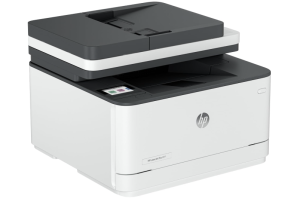
HP LaserJet Pro MFP 3101sdw Instructions Manual
The manual below includes a User Guide to teach the user how to use the printer, a Setup and a Reference Guide to prepare the installation and assemble the printer.
Download the HP LaserJet Pro MFP 3101sdw User Guide, Reference, and Setup
HP LaserJet Pro MFP 3101sdw User Guide
Filename: pdf_13623916_en-US-1.pdf
Size: 4.04 MB
Description: This guide provides configuration, printer use, warranty, safety, and environmental information.
HP LaserJet Pro MFP 3101sdw Reference Guide
Filename: pdf_14259550_en-US-1.pdf
Size: 2.17MB
Description: Describes the printer’s function and hardware.
HP LaserJet Pro MFP 3101sdw Setup Guide
Filename: pdf_14259554_en-US-1.pdf
Size: 1.52MB
Description: Get help to set up your printer.
Hewlett-Packard owns all HP LaserJet Pro MFP 3101sdw Manuals; the user agrees to the agreement from HP.