The HP Smart Tank 7303 is a versatile all-in-one ink tank printer designed for home and small-office use. A compact 2-line LCD with smart guided buttons provides easy access to printer functions, while an 800 MHz processor and 256 MB of memory help handle everyday office tasks. It features a 250-sheet input tray, 100-sheet output tray, and a 35-sheet automatic document feeder (ADF). It supports a wide range of paper sizes, including A4, A5, A6, B5, envelopes, cards, and custom media. It delivers print speeds of up to 15 pages per minute in black and 9 pages per minute in color, with the first black page ready in as little as 14 seconds. Using HP Thermal Inkjet technology, it produces black prints at up to 1200 x 1200 rendered dpi and color prints at up to 4800 x 1200 optimized dpi. The HP Smart Tank 7303 supports automatic duplex printing and borderless printing up to A4 size. For scanning and copying, it combines a flatbed scanner with its 35-sheet ADF. It offers optical scanning resolution of up to 1200 dpi, supports JPG, BMP, TIFF, PDF, and PNG formats, and can scan documents up to 216 x 297 mm. Scan speeds reach up to 8 ipm for black documents and 3.5 ipm for color. Copying is supported at resolutions of up to 600 dpi, with reduction and enlargement from 25% to 400% and up to 99 copies per job, making the printer a practical solution for a wide range of everyday document tasks. Its recommended monthly page volume is 400 to 800 pages, while the maximum monthly duty cycle is up to 5,000 pages. The printer uses four ink bottles—one black bottle and three color bottles—making it suitable for users who need economical, high-volume ink printing. The HP Smart Tank 7303 also provides flexible connectivity with dual-band 2.4/5 GHz Wi-Fi, Wi-Fi Direct, Ethernet, and USB 2.0. Mobile printing is supported through Apple AirPrint, Mopria, the HP Print Service Plugin for Android, the HP Smart app, and Wi-Fi Direct Printing.
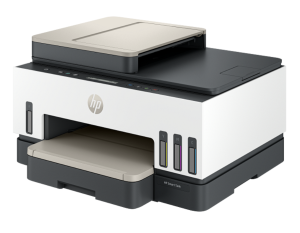
HP Smart Tank 7303 Instructions Manual
The manual below includes a User Guide to teach the user how to use the printer, a Setup Guide, and a Reference to prepare for the installation and assemble the printer.
Download the HP Smart Tank 7303 User Guide, Reference and Setup
HP Smart Tank 7303 User Guide
Filename: pdf_4228390_en-US-1.pdf
Size: 3.7 MB
Description: This guide provides the configuration and how to use an HP printer. For printer setup, visit HP Smart Tank Printers – First time printer setup.
All HP Smart Tank 7303 Manuals are copyrighted by Hewlett-Packard; the user agrees to the agreement from HP.