The HPE Aruba AP-505 is a Wi-Fi 6 (802.11ax) indoor enterprise access point designed for high-efficiency wireless connectivity in environments such as offices, schools, and commercial buildings. It belongs to the Aruba 500 Series and is built to support modern high-density client usage with improved performance and better spectrum efficiency. These are integrated into the compact design, allowing for easy ceiling or wall mounting without external antenna components. This access point operates on dual bands, 2.4 GHz and 5 GHz, using a 2×2 MU-MIMO configuration on both radios. It supports Wi-Fi 6 technologies such as OFDMA and MU-MIMO, which help improve overall network capacity and reduce congestion when many devices are connected. The HPE Aruba AP-505 delivers a maximum combined wireless throughput of up to 1.874 Gbps, with up to 1.2 Gbps on the 5 GHz band and up to 574 Mbps on the 2.4 GHz band.
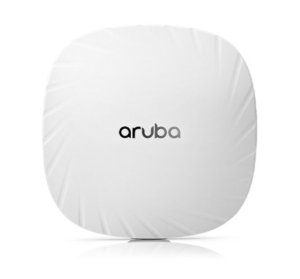
For wired connectivity and power, this access point includes a single Gigabit Ethernet port that supports Power over Ethernet (PoE). The access point also includes built-in Bluetooth 5.0 and Zigbee support, enabling IoT integration alongside traditional Wi-Fi networking. This makes it suitable for smart building applications. It can be deployed in different management modes, including Aruba Instant (controllerless), controller-based architecture, or cloud-managed via Aruba Central. A USB port is also available for future expansion or specific use cases, although its functionality may depend on available power budget. The HPE Aruba AP-505 is designed to support a high number of clients, typically up to 256 devices per radio, and can handle up to 16 SSIDs per radio. This makes it suitable for busy environments that require multiple user groups and network segmentation.
Download HPE Aruba AP-505 Manual Instructions
Refer to the specifications to ensure the HPE Aruba AP-505 is compatible with your requirements and to avoid issues during installation or use.
Download HPE Aruba AP-505 User Guide Manual
The manual below includes a Quick Setup Guide to teach the user how to use the HPE device.
The default password/credentials for HPE Aruba AP-505:
username: admin
password: admin or serial number of the device (usually in uppercase)
HPE Aruba AP-505 Installation Guide
Filename: AP-500_Install_Guide_EN.pdf
Size: 2.4MB
Check Also: HPE Instant On AP22 Manual
All HPE Aruba AP-505 Manuals are copyrighted by Hewlett-Packard Enterprise; the user agrees to the agreement from HPE.