The HP ENVY 6110e is a versatile wireless all-in-one printer designed for everyday home and personal use, combining print, copy, scan, and mobile fax functions in a compact device. It features a 2.4-inch color capacitive touchscreen for straightforward operation and supports a wide range of paper sizes, including A4, A5, B5, A6, envelopes, and 10 × 15 cm photo paper. Its 100-sheet input tray and 25-sheet output tray are suitable for regular household printing, while borderless printing is supported up to 8.5 × 12 inches. It can handle plain paper, photo paper, brochure paper, presentation paper, cards, and other compatible inkjet media, with supported paper weights ranging from 60 to 90 g/m² for plain paper and up to 300 g/m² for HP photo paper. Powered by HP Thermal Inkjet technology and an 800 MHz processor with 256 MB of DDR3 memory, it delivers sharp documents and vibrant color prints. Print quality reaches up to 1200 × 1200 rendered dpi for black and up to 4800 × 1200 optimized dpi color when using compatible HP photo paper. The printer produces the first black page in as little as 19 seconds and supports automatic two-sided printing for convenient and more efficient document handling.
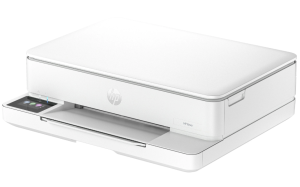
This HP ENVY 6110e multifunction printer uses a flatbed scanner with an optical resolution of up to 1200 dpi, 24-bit color depth, and a maximum scan size of 216 × 297 mm. It supports scanning to PDF, JPG, PNG, TIF, and HEIF, as well as convenient scan-to-email, scan-to-PC, scan-to-file, and HP Cloud functions. Copying supports up to 99 copies at resolutions of up to 300 × 300 dpi for both black and color documents. The printer also supports mobile fax for sending documents directly from a mobile device. Connectivity is handled through dual-band Wi-Fi 802.11a/b/g/n/ac and a Hi-Speed USB 2.0 port. Mobile printing is supported through the HP app, Apple AirPrint, Mopria, Chrome OS, and the HP Print Service Plugin for Android. The printer is also eligible for HP Instant Ink, providing an optional way to manage ink supplies.
HP ENVY 6110e Instructions Manual
The manual below includes a User Guide to teach the user how to use the printer, a Setup Guide, and a Reference Guide to prepare the installation and assemble the printer.
Download the HP ENVY 6110e User Guide and Reference Information
HP ENVY 6110e User Guide
Filename: pdf_10011374_en-US-1.pdf
Size: 2.17 MB
Description: This guide provides configuration, using the printer, warranty, safety and environmental information.
HP ENVY 6110e Reference Information
Filename: pdf_10986127_en-US-1.pdf
Size: 0.78 MB
Description: Describes the printer’s function and hardware.
All HP ENVY 6110e Manuals are copyrighted by Hewlett-Packard; the user agrees to the agreement from HP.