The HP DeskJet 4310 All-in-One is a compact inkjet printer designed for everyday home use, offering print, copy, and scan functions in a single device. It delivers print speeds of up to 8.5 ppm in black and 5.5 ppm in color, with a maximum print resolution of 1200 × 1200 rendered dpi for black documents and 4800 × 1200 optimized dpi for color prints. Powered by HP Thermal Inkjet technology, it uses two ink cartridges (one black and one tri-color) and is recommended for a monthly print volume of 100 to 300 pages. For scanning and copying, this multifunction printer features a flatbed scanner with a 35-sheet automatic document feeder (ADF), making it easy to digitize or copy multi-page documents. It offers an optical scan resolution of up to 1200 dpi and supports common file formats such as PDF, JPEG, TIFF, and PNG. The HP DeskJet 4310 includes a 60-sheet input tray and a 25-sheet output tray, supports manual duplex printing, and connects via Hi-Speed USB 2.0 or dual-band Wi-Fi (2.4 GHz and 5 GHz). Mobile printing is supported through the HP app, Apple AirPrint, Mopria Print Service, and HP Print Service Plugin, making it convenient to print from smartphones, tablets, and laptops.
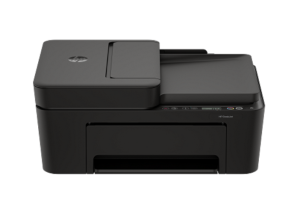
HP DeskJet 4310 Instructions Manual
The manual below includes a User Guide to teach the user how to use the printer, a Setup Guide, and a Reference Guide to prepare for the installation and assemble the printer.
Download the HP DeskJet 4310 User Guide and Setup
HP DeskJet 4310 User Guide
Filename: pdf_12161035_en-US-1.pdf
Size: 2.00 MB
Description: This guide provides the configuration and how to use an HP+ compatible printer.
HP DeskJet 4310 Setup Guide
Filename: pdf_12166289_en-US-1.pdf
Size: 0.90MB
Description: Get help to set up your printer.
All HP DeskJet 4310 Manuals are copyrighted by Hewlett-Packard, user agrees to the agreement from HP.