The HP LaserJet M220d is a monochrome laser printer designed for home offices and small businesses that need fast, reliable, and high-quality black-and-white printing. It comes with a 150-sheet input tray and a 100-sheet output tray, supporting various media types, including plain paper, envelopes, cardstock, postcards, and labels. The printer has print speeds of up to 30 pages per minute (A4) and can produce the first page in as little as 4.9 seconds, helping improve productivity when handling everyday printing tasks. With a print resolution of up to 600 × 600 dpi, it produces clear and professional-looking text and documents. With a recommended monthly print volume of 200 to 2,000 pages and a maximum monthly duty cycle of 20,000 pages, it is suitable for regular office printing needs.
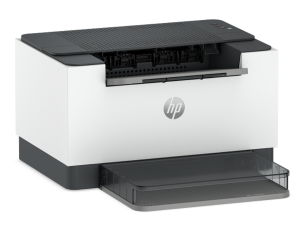
For connectivity, the printer includes a Hi-Speed USB 2.0 port and supports mobile printing via Apple AirPrint and Wi-Fi Direct, with the required app and compatible device. Powered by a 1 GHz processor and equipped with 64 MB of memory, the HP LaserJet M220d supports Windows, macOS, and Linux operating systems, making it a practical choice for users looking for an efficient and compact monochrome laser printing solution.
HP LaserJet M220d Instructions Manual
The manual below includes a User Guide to teach the user how to use the printer, and a Repair Manual to prepare for installation, assembly, and maintenance of the printer.
Download the HP Laserjet M220d User Guide
HP Laserjet M220d User Guide
Filename: pdf_14545483_en-US-1.pdf
Size: 2.57 MB
Description: This guide provides configuration, using the printer, warranty, safety and environmental information.
All HP LaserJet M220d Manuals are copyrighted by Hewlett-Packard; the user agrees to the agreement from HP.