The HP ENVY 4310 is a compact all-in-one inkjet printer designed for everyday home and personal use. It is compatible with both PC and Mac computers and supports A4 paper sizes. It has a 60-sheet paper capacity and supports manual two-sided printing, making it suitable for documents, schoolwork, and occasional photo printing. The printer uses two ink cartridges and is compatible with HP 308 ink. The printer delivers speeds of up to 8.5 pages per minute (ppm) for black text and 5.5 ppm for color text, with print resolutions of up to 1200 × 1200 dpi for black and 4800 × 1200 dpi for color. This multifunction printer features a flatbed scanner with an optical resolution of up to 1200 × 1200 dpi. The scanner accommodates documents and images up to A4 size, providing enough detail for everyday scanning and copying tasks. Its combination of printing, scanning, and copying functions makes it a versatile choice for home users who need a single device for multiple tasks.
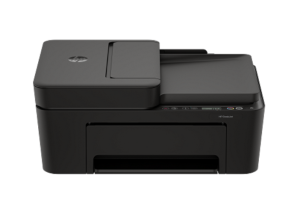
Connectivity includes both USB and Wi-Fi, allowing the printer to be connected directly to a computer or used wirelessly across a home network. HP ENVY 4310 also supports mobile printing through the HP app, allowing users to print directly from compatible smartphones and tablets. Apple AirPrint is supported on compatible devices. For computer compatibility, Windows users need Windows 10 or Windows 11 with at least a 1 GHz processor, 2 GB of available hard-disk space, and an internet connection. Mac users require macOS 13 Ventura, macOS 14 Sonoma, or macOS 15 Sequoia, along with 2 GB of available storage and internet access.
HP DeskJet 4310 Driver for Windows and macOS
Refer to the operating system’s compatibility and ensure that the HP DeskJet 4310 printer is compatible with your PC or Mac to avoid errors when installing the driver or using the printer.
Download HP DeskJet 4310 Drivers and Software Compatibility
Windows Driver:
- Windows Compatibility: Windows 10 and Windows 11
HP DeskJet 4310 Easy Start Printer Setup Software and Driver Download
Filename: HPEasyStart_17_3_14.exe
Version: V17.3.14
Size: 24.0 MB
HP DeskJet 4310 Printer Driver Setup Software Download
Filename: HPEasyStart-16.8.12-DJ4300_63_1_42_3_Webpack.exe
Version: V63.1.42
Size: 373.5 MB
HP DeskJet 4310 Printer Driver Setup Software (ARM architecture) Download
Filename: HPEasyStart-17.2.17-DJ4300_63_1_80_Webpack.exe
Version: V63.1.80
Size: 384.1 MB
HP DeskJet 4310 Universal Scan Driver Download
Filename: Full_Webpack-63.8.6459-SJ0001_Full_Webpack.exe
Version: V63.8.6459
Size: 436.2 MB
macOS Driver:
- macOS Compatibility: macOS 26, macOS 15, macOS 14, macOS 13
HP Print and Support for Mac: Install from App Store
The HP DeskJet 4310 printer is AirPrint-supported.
Read Also: HP DeskJet 4310 Manual to guide you how to install the printer
All HP DeskJet 4310 Drivers are copyrighted to Hewlett-Packard; the customer agrees to the applicable license or other agreement from HP.