The HP DeskJet 2910 is a compact all-in-one inkjet printer designed for home users and light everyday printing needs. Featuring a 60-sheet input tray and a 25-sheet output tray. The printer supports manual duplex printing, allowing users to print on both sides of the page with manual intervention. Borderless printing is not supported on this model. It features printing, copying, and scanning functions in a space-saving design, making it suitable for students, families, and users who need an affordable solution for occasional document and color printing tasks. The printer uses HP Thermal Inkjet technology and delivers print speeds of up to 7.5 pages per minute for black-and-white documents and up to 5.5 pages per minute for color prints. The first black page can be produced in as little as 16 seconds. It supports a monthly duty cycle of up to 1,000 pages, while HP recommends a monthly print volume of approximately 50 to 100 pages for optimal performance and long-term reliability. Printing resolution reaches up to 1200 × 1200 dpi for black output and up to 4800 × 1200 optimized dpi for color printing, providing clear text and vivid colors for everyday use. For scanning and copying tasks, this series includes a flatbed scanner with an optical resolution of up to 1200 dpi. It supports multiple scan file formats, including PDF, JPEG, TIFF, and PNG. The copier function can create up to 9 copies at a time, making it useful for basic home and personal document duplication. The HP DeskJet 2910 also includes modern connectivity features such as dual-band Wi-Fi and a Hi-Speed USB 2.0 port. It supports mobile printing through the HP app, Apple AirPrint, and Mopria services, providing flexible printing options across different devices and operating systems.
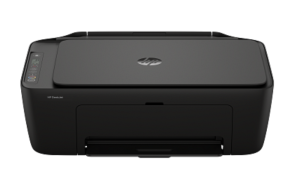
HP DeskJet 2910 Instructions Manual
The manual below includes a User Guide to teach the user how to use the printer, a Setup Guide, and a Reference Guide to prepare for the installation and assemble the printer.
Download the HP DeskJet 2910 User Guide and Reference Guide
HP DeskJet 2910 User Guide
Filename: pdf_12161035_en-US-1.pdf
Size: 2.00 MB
Description: This guide provides configuration and how to use an HP+ compatible printer.
HP DeskJet 2910 Quick Start Guide/Reference
Filename: pdf_14083936_en-US-1.pdf
Size: 1.59MB
Description: Describe the printer’s function and hardware.
All HP DeskJet 2910 Manuals are copyrighted by Hewlett-Packard, user agrees to the agreement from HP.